


My Days - Period Ovulation android app free download
 android
| Rate this app: |

apk | 200 KB
Description
Ver 0.97, for Android OS 1.1 and up
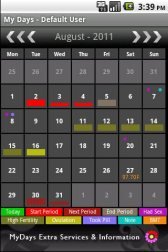
Easy tracking & prediction calendar for your period, ovulation and fertility.
The Original: My Days - Period & Ovulation ?
Track & predict your period, ovulation and fertility.
Features include:
- Calendar
- Multi User support
- Multiple languages (en,de,it,es,fr,cn,tw)
- Add personal info regarding birth control; notes, intercourse, pill, ..
- eMail History to yourself or your Doctor
- Backup
- Basal metabolic temperature (BMT) Chart
- 4 Widgets
- Customizable colors
+ Pro Trial Password lock & reminder
MyDays is the perfect and simplest Calendar for every woman.
(not just for women, many men find MyDays useful for understand their partner's cycle, too)
Please feel free to send me an email with any concerns, problems or suggestions via my website listed below. I will answer all your questions ASAP. I can't answer directly in the Android Market. Thank you!
Information, Hints & Tips:
- Check the "About" page for the Pro Version where you can disable ads, set a password, and set up alarms and notifications.
- Internet permission is only required for the internal "web-based" community chat and for ads. Your data is private!
- Pro users get the Pro version from the email they receive after purchase (update will overwrite the basic version with the pro version) or send me an email with your purchase email and full name.
- If the Widget disappears after an update, simply restart your device.? Also remember Widgets ONLY work when the app is installed internally, not when installed on the SD card.
- If this version should force close on your device, try an older version here:?
http://christian-albert-mueller.com/mydays/dl/mydays09basic.apk
- Galaxy Nexus users: Do not enable "Hardware Acceleration" in the Settings. ?While enabled, the app seems to appear in mini size on your screen.
- After Backup to the SD Card always UN-MOUNT the card in your Device Settings before you remove the SD-Card.
For more tips to fix device-specific SD-Card problems, please see my website here:
?http://christian-albert-mueller.com/mydays/fix-sd-card-import-problems/
Thank you
Your 5-star ratings keep me working!
Similar Apps


