


xls2mssql
version 2.00 |  windows
windows
Name: xls2mssql
Version: 2.00
Size: 1.52 MB
Category: Applications
License: Free
Released: 2009-06-15
Developer:
Downloads: 939
Version: 2.00
Size: 1.52 MB
Category: Applications
License: Free
Released: 2009-06-15
Developer:
Downloads: 939
| Rate this software: |

zip | 1.52 MB
Description
This is a converter from XLS (Excel) to MS SQL Server.The application works on the command line. The converter is very fast and reliable.
Does not need Excel. None of the installation process.
xls2mssql.exe connecting to MSSQL via ODBC Server.
The connection string must be defined in a file: SQLConnection.cfg in current directory.
For more information about connection strings, see: www.connectionstrings.com/sql - server - 2005
Before running xls2mssql, you need to configure the connection.
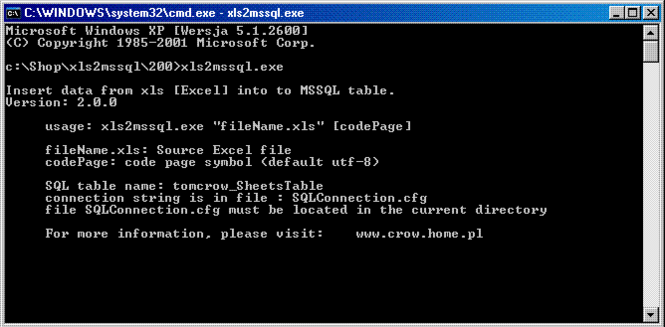
Program can call with two parameters:
-Required first: full path to xls
-Optional second: to determine the character encoding [default value = utf-8]
The program operates in the following steps:
- connection to the database server using ODBC.
- checks the existence of the table: [tomcrow_SheetsTable
- if this table does not exist it is created. Script to create a table on this page.
- downloading data from XLS file
- inserting the data into a SQL table
SQL TABLE The table is created only if it does not exist in the database
CREATE TABLE tomcrow_SheetsTable
(GUID UNIQUEIDENTIFIER NOT NULL,
ROW INT NOT NULL,
Date DateTime NOT NULL DEFAULT(getDate()),
xls NVARCHAR(255),
sheet NVARCHAR(255),
F1 NVARCHAR(1000),
F2 NVARCHAR(1000),
F3 NVARCHAR(1000),
...
...
...
F98 NVARCHAR(1000),
F99 NVARCHAR(1000),
F100 NVARCHAR(1000),
CONSTRAINT PK_tomcrow_SheetsTable PRIMARY KEY CLUSTERED(GUID asc, sheet asc, ROW asc)
The table can be modified in the following areas:
- Add fields
- Extending the fields size
- Adding indexes
- Extending the key primers
SQLConnection.cfg
SQL Authentication mode:
[SQLServer]
ConnectionsString = Driver={SQL Native Client};Server=MyServer ; Database = MyDatabase ; Uid = MyLogin ; Pwd = MyPassword ;
Windows Authentication mode:
[SQLServer]
ConnectionsString = Driver={SQL Native Client};Server=MyServer ; Database = MyDatabase ; Trusted _ Connection = yes ;
Screenshots
Similar Software
Easy Pdf Password Remover Free 5.2Advanced ID Creator Personal 9.31.245etichettexp 4.2Expert Advisor Easy Card Creator Free Bytescout BarCode Generator 2.20.386AbusePipe 3.0Collections MAX 2.4Reportizer Viewer 4.02Month Limit Info Prodigy 123 Word to Pdf Converter Free 6.1CCAutoSoft 3.04.11Amortization Schedule Calculator Advanced Word to Pdf Converter Free 6.1


