


ADVSoft SQL Backup
version 2.0.252 |  windows
windows
Name: ADVSoft SQL Backup
Version: 2.0.252
Size: 9.75 MB
Category: Backup & Recovery
License: Free
Released: 2016-07-21
Developer: Advsoft
Downloads: 1102
Version: 2.0.252
Size: 9.75 MB
Category: Backup & Recovery
License: Free
Released: 2016-07-21
Developer: Advsoft
Downloads: 1102
| Rate this software: |

exe | 9.75 MB
Description
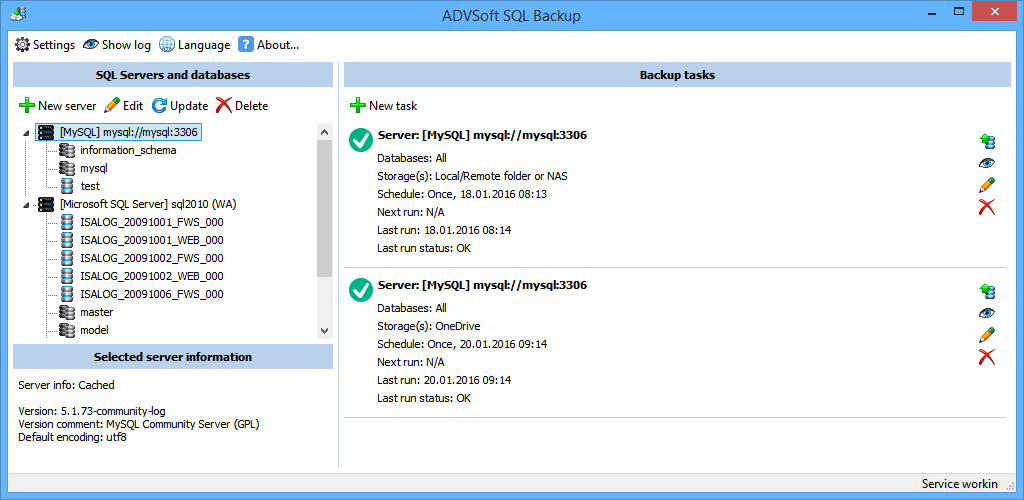
Backup MySQL and Microsoft SQL Server databases into the cloud! ADVSoft SQL Backup is a must-have database maintenance tool offering an extra safety layer for two popular database types. The database backup tool supports MySQL (via phpMyAdmin and SSH) and Microsoft SQL Server. Network administrators can configure ADVSoft SQL Backup to back up multiple databases on a schedule. ADVSoft SQL Backup comes with comprehensive journaling capabilities and includes full control over backup and restore jobs.Unlike competing tools, ADVSoft SQL Backup supports multiple backup destinations including local and remote NAS, FTP servers, as well as popular cloud services such as Box.com, Dropbox, Microsoft OneDrive and Google Drive. The Professional edition supports additional destinations including Microsoft Azure and Amazon S3 instances, 7Zip compression and AES encryption. ADVSoft SQL Backup serves both on-premises databases and hosted environments, allowing to access MySQL databases over phpMyAdmin, TCP/IP or over secure SSH protocol.
Cloud backups have a number of advantages over traditional backup methods such as disk and tape. Stored off premises, cloud backups will survive accidents and outlive your local infrastructure even if your entire network goes down. Cloud backups are flexible, reliable and secure, offering improved disaster recovery to get back online as soon as possible. Cloud backups can be used to quickly deploy a duplicate instance of your database on another server should the need come. With ADVSoft SQL Backup, you can fully employ cloud backup functionality to back up your MySQL and Microsoft SQL Server databases to a cloud service of your choice.
Don’t trust public cloud services? You can use a local or remote NAS, back up to an FTP server, or employ a custom Microsoft Azure or Amazon S3 instance to store your backups. Secure AES encryption will protect your backups from prying eyes.
Screenshots
Similar Software
Data Recovery using ADRC Software Safe Backup UpSafe Gmail Backup Freeware 7-Data Recovery Suite Free 3.2FIBS Firebird-Interbase Backup Scheduler Zero Assumption Digital Image Recovery Drive Image Restorer Export Microsoft Access MDB to CSV HData Recovery 4.7 - Recover Deleted Files 4.7.1.2Keriver 1-Click Restore Free Plugin 2.1Syncsi Portable for Outlook 2.5DriveHQ Online Backup Enterprise Edition 5.0.375Smart Partition Recovery 2.4SimpleBackup VAIOSoft Recovery Manager V1


