


Microsoft Windows 10 Final Release
version 1.0 |  windows

Name: Microsoft Windows 10 Final Release
Version: 1.0
Size: 18.19 MB
Category: System Tools
License: Free
Released: 2016-04-04
Developer: Microsoft
Downloads: 1164
Version: 1.0
Size: 18.19 MB
Category: System Tools
License: Free
Released: 2016-04-04
Developer: Microsoft
Downloads: 1164
| Rate this software: |

exe | 18.19 MB
Description
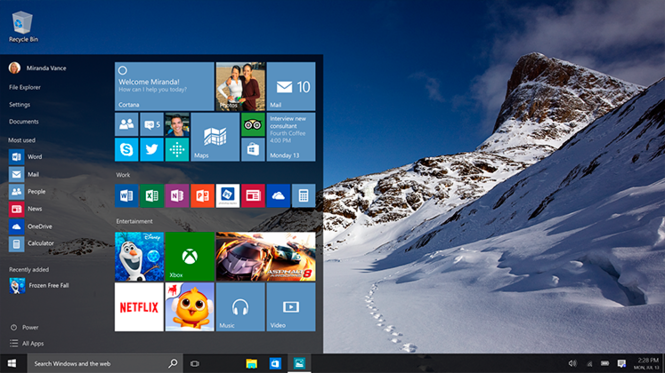
Familiar and better than everWindows 10 is familiar and easy to use, with lots of similarities to Windows 7 including the Start menu. It starts up and resumes fast, has more built-in security to help keep you safe, and is designed to work with software and hardware you already have.
Millions of people are already using Windows 10
The Windows Insider Program is a global community of fans who love Windows and want to help make it better. Insiders see the operating system in its earliest stages, and play a role in shaping it. Their feedback has contributed to the best Windows ever.
Make the web work the way you do
Microsoft Edge lets you move quickly from browsing to doing. Write1 or type notes directly on webpages and share them with others, read online articles free of distraction, and save your favorite reads for convenient access later.
Multi-doing helps you get to “done” faster
Get to done faster by better managing your desktop. Snap up to four things on one screen at the same time and create virtual desktops whenever you need more space or want to group things by project, like Office apps for work and games for play.
The new Windows Store is the one place for all your favorites
Introducing the new Windows Store, a unified shopping experience across every Windows 10 device. Browse the store on your PC, tablet, or phone and easily download great free and paid digital content including apps, games, music, movies, and TV shows.
Great built-in apps that work across your devices
Windows 10 comes with great built-in apps4 like Maps, Photos, Mail & Calendar, Music, Movies & TV. And these apps use OneDrive to back up your information and sync seamlessly across your Windows 10 devices, so you’re never far from what you need.
The best screen is always the one you’re on
Windows 10 enables your apps to look and work great in all modes, on all touch PCs and tablets
Screenshots


Similar Software
AceHelper :: Total Commander Plugin 3.5EnCalcLU 3.5TIGME RCalc TweakNow PowerPack 2012 4.2.4Chily Active Directory Query 9.09.01ShutdownTray BIOSAgent 3.66UltraFileSearch 2.7.0.12213Free Virtual Serial Ports Emulator Pathbuddy Konvertor 5.03.4PC Brother Software Administration EMCO Remote Registry Exporter 2.3Add/Remove Pro 2.12BlueScreenView


