


SI Trace
version 1.0 |  windows
windows
Name: SI Trace
Version: 1.0
Size: 306.87 KB
Category: Network Monitoring & Info
License: Free
Released: 2007-07-26
Developer: Wincatalog.com
Downloads: 976
Version: 1.0
Size: 306.87 KB
Category: Network Monitoring & Info
License: Free
Released: 2007-07-26
Developer: Wincatalog.com
Downloads: 976
| Rate this software: |

exe | 306.87 KB
Description
If you cannot connect to a computer over a network, there might be something wrong with the remote PC or with your Internet connection. Or your router might need a reset. Or your Internet provider could be having a temporarily problem that they'll eventually solve. Or maybe it's the fault of one of the routers, switches, access points, servers, or other network hosts that are in between you and the remote computer. How would you know for sure?In the beginning of the Internet, a tool called traceroute was introduced in Unix. Traceroute does exactly what its name suggests: it traces the route of IP packets while they travel from your PC to the remote destination. The tool essentially allows you to see exactly where the connectivity problem is, no matter how far it is from your computer. The last host to respond to traceroute is the last host that is working properly. The first one that fails to respond is the faulty one.
There is a free tool called tracert.exe that comes with most versions of Windows. You can use this tool to traceroute the remote PC. To use tracert.exe, you would typically invoke a command line, which would open a black console window, and type tracert.exe followed with the IP address of the computer you want to check. Usually you would get a response right in the console window in a matter of seconds. You get the response in a Spartan-looking black console window.
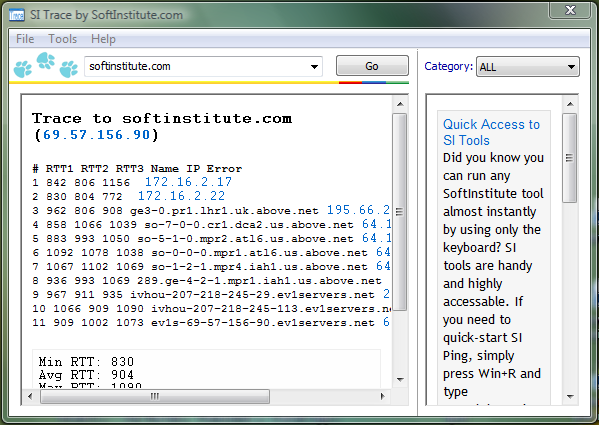
While there's nothing particularly wrong in using the supplied tracert.exe, we at Soft Institute wrapped the same thing into a much more convenient package. SI Trace provides clearly legible, well-formatted output by providing easy to understand numbers and well-explained results. It displays all the vital information from classic Unix traceroute and Windows tracert commands, and allows you to check more than one computer by simply selecting the address from a combo box. Thanks to its user-friendly interface, it is much more convenient to use than Windows tracert.
Screenshots
Similar Software
Softerra LDAP Browser 4.5SEO Backlink Checker NetBalancer Free 5.2Free IP Tools 4.2SI Trace Metriscope (with Windows Pack) 3.2.1VoIP Network Tester MIB Browser Netcut 2.1.4NEWT Freeware Network Inventory 2.5.153ExInsight for Microsoft Exchange VE Network Catcher Lite 4.6FREE WEB SITE UPTIME MONITOR SERVICE PacketViewer CAS Modbus Explorer


